| roncli.com blog |
| roncli.com |
| blog |
| Profile |
 |
| roncli |
| Houston, Texas, United States |
| Labels |
| Coding |
| CTG Music |
| Editorials |
| Games |
| Miscellaneous |
| Music |
| Servers |
| Silliness |
| Software |
| Sports |
| Trax in Space Beta |
| Weather |
| Thursday, November 25, 2010 |
|
jQuery UI Scroll Menu 1.0 Posted: 11:52:00 PM 0 comments |
For the past couple of years, I've been getting more and more conscious about how many entries are starting to fill up the left side pane of the site. The months in particular are starting to become huge. What I wanted was a compact menu that you could scroll through, keeping the number of visible items down while allowing for any number of items to exist in the menu. Something like this: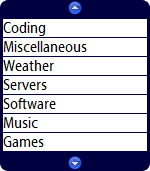 Last night, I started playing with DIVs, ULs, LIs, and jQuery UI to see if I could get to where I wanted to go. Well, after a couple of long coding sessions surrounding a bout with tryptophan, and after wrestling IE and Firefox into submission, I finally got what I wanted. Introducing jQuery-ui-ScrollMenu-1.0.js. Documentation can be found at the top of the file in the comments. It should be fairly straightforward, although instead of using CSS like I had wanted, I instead just went with setting CSS styles. I'm not 100% happy with how the code was put together, but the bottom line here is that it works, and it's pretty. Perhaps I'll go back and make it compliant with CSS (or maybe someone will do it for me!), but for now I'm going to release it as is. Labels: Coding, JavaScript, jQuery UI Scroll Menu, Screenshot |
| Sunday, October 03, 2010 |
|
jQuery Default Button 1.0 Posted: 5:28:00 PM 0 comments |
|
I was searching the Internet today for something that would replace asp:Panel's DefaultButton property. I found a lot of solutions, but the fact that you had to add several lines of code to every page didn't appeal to me. What I wanted to do was something like this: $("#LoginForm").DefaultButton("#LoginButton");
This jQuery snippet would simply take the login form with an id of "#LoginForm" and make it so that any time you pressed the enter button within that form, it would click the "#LoginButton". Well, now I can. I created a jQuery plugin that does exactly this. Download jQuery Default Button 1.0. Labels: Coding, JavaScript, jQuery Default Button |
| Thursday, September 04, 2008 |
|
Reporting Services ReportViewer in browsers other than IE Posted: 4:57:00 PM 0 comments |
|
So I've been working with SQL Reporting Services at work lately, and was annoyed with how slow it was in Internet Explorer. I tried running other browsers, but it just never rendered right. Well, after an hour or two of research, I finally came up with a method to get these browsers to render correctly. The syndrome that many users experience is that the table becomes squished, as if the table of results wants to be as thin as possible. The reason for this is because someone at Microsoft in all of their brilliance decided to put the results table inside a cell of another table, and in that same row they added a 2nd cell with 0 height (WTF?) and 100% width (WTF!). The 100% width squishes everything in the first cell to as little width as possible. JavaScript to the rescue: <script type="text/javascript">
function addLoadEvent(func) {
var oldonload = window.onload;
if (typeof window.onload != 'function') {
window.onload = func;
} else {
window.onload = function() {
if (oldonload) {
oldonload();
}
func();
}
}
}
function checkEmptyCells() {
var all = document.getElementById("<%=rvReport.ClientID%>").all ? document.getElementById("<%=rvReport.ClientID%>").all : document.getElementById("<%=rvReport.ClientID%>").getElementsByTagName('*');
for (var i = 0; i < all.length; i++) {
if (all[i].tagName == "TD" && all[i].width == "100%" && all[i].height == "0" && all[i].innerHTML == "") {
all[i].width = "1px";
}
}
}
addLoadEvent(checkEmptyCells);
</script>
The first function is simply a function that updates the window.onload event, so that even if you already have an onload event you don't have to mess with that code. The second function checks for the offending empty TD, and reduces its width to 1 pixel. Change rvReport to whatever the ID of your ReportViewer control is. Take that, empty cell! Finally, we call the addLoadEvent with our handy checkEmptyCells function. What will happen is the browser will wait until everything is loaded and then execute the script. If the checkEmptyCells function looks familiar, it should... I borrowed this from my own code. Remember me getting rid of the red X's on OSMusic.Net? I used the checkImages function for that. The code is very similar, but instead of checking for unloaded images and hiding them, we're checking for bloated empty cells and thinning them. Leave it to Microsoft to figure out how to screw up nested tables. Leave it to JavaScript to be able to provide a quick, easy fix. Labels: Coding, JavaScript, OSMusic.Net, SQL Reporting Services |
| Tuesday, June 06, 2006 |
|
JavaScript Red X remover Posted: 6:57:00 PM 0 comments |
After a bit of frustration at the front page of OSMusic.Net having red X images, I decided to write something that will check for bad and broken images and remove them altogether from the display. It's a drity hack, but it works rather well.
function checkImages() {
 var all = document.all ? document.all : document.getElementsByTagName('*');
 for (var i = 0; i < all.length; i++)
 {
  if (all[i].tagName == "IMG")
  {
   if (all[i].complete == false)
   {
    all[i].style.visibility = "hidden";
    all[i].style.display = "none";
   }
  }
 }
}

<body onload="checkImages();">
Labels: Coding, JavaScript, OSMusic.Net |